
Talent Llama + Lever Integration
Talent Llama’s integration with Lever streamlines the entire hiring workflow by automatically syncing candidates between platforms. Hiring teams can import and invite candidates to interview from any stage in the Lever pipeline, eliminating manual exports and triggering AI interviews at the right time.
As interviews are completed, results and candidate statuses flow instantly back to Lever, keeping it as the single source of truth. Your recruiters can review evaluations, advance top candidates, or reject directly from Talent Llama. The result: less admin, faster screening, and a smoother experience for both teams and candidates.
Before you begin: Like anything worth doing, integrations can take a little time. We don't anticipate it taking more than 30 minutes, but you might want to have a system expert and/or system administrator to assist in the completion of this integration.
Enable Webhooks in Lever
From Lever, in the Top Navigation to the right, hover over your Account Icon and click Settings, then on the Side Navigation, click Integrations and API. Then click the Webhooks tab.

Turn on Application Created and Candidate Stage Change.
Connect Lever to Talent Llama
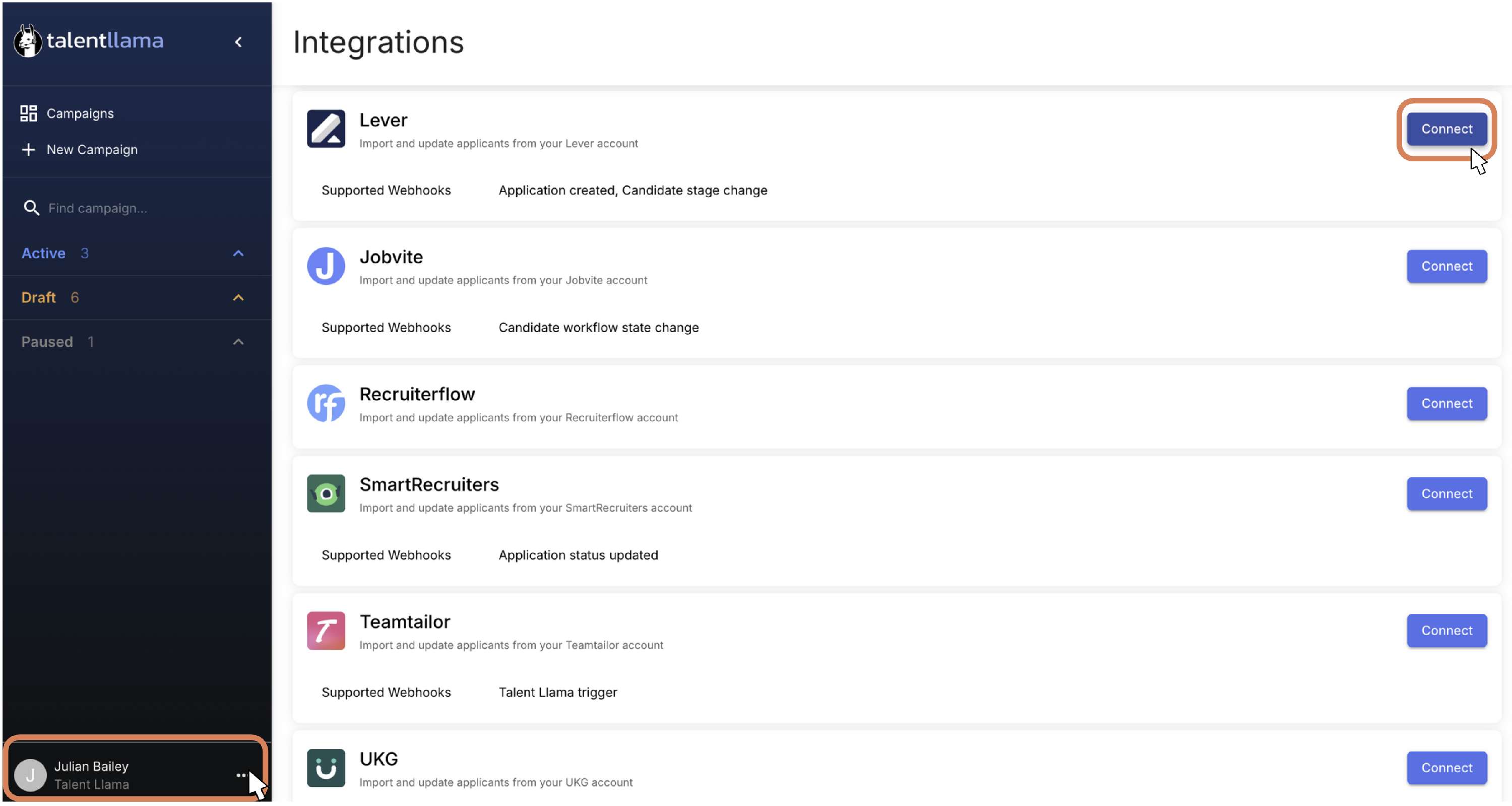
In the bottom-left corner, click the three dots ( ⋯ ), select Integrations, then click Connect next to Lever to connect the integration.
Sign in with your Lever credentials and click Continue.

Click Accept to Authorize the Integration.

Talent Llama will need access to Webhooks, Archive Reasons, Opportunities, Postings, Stages and Offline Access.
Once you click Accept, you will be automatically redirected back to Talent Llama where you will see the Lever Integration shown as Connected.

Using Lever in Talent Llama
With your integration connected, you can now send Talent Llama interview invitations when candidates first apply, or when they move into one or more stages.

- From the Applicants tab, click the button to the right that says Import from Lever
- Find the Job from Lever by typing the job name
- Select the Job from which you want to import applicants
- Select one or more Stages from which you want to import applicants
- Click Start Import
- Check the status of any import by clicking the Import History button at the top of the Applicants tab

Turn on Automatic Invitations (Optional)
If you want full automation of interview invitations, you can configure Talent Llama to auto-send email invitations when applicants are imported. Make sure to review your Email Invitation content under Account Settings before activating.

Edit Linked Job Interview Stages
If you’ve made a mistake when selecting Interview Stages, or changed your hiring workflow, you can edit the Interview Stages that will be synced with Talent Llama. When applicants move into one of these Interview Stages, their application will automatically be imported into Talent Llama.
Update Lever Applicant Status from Talent Llama
When applicants finish their interview, Talent Llama provides an instant Evaluation. With the Talent Llama and Lever Connection, you can modify the applicant’s status in Lever directly from the Talent Llama evaluation. You’ll know an applicant is synced to Lever from the logo and Interview Stage showing next to the applicant’s name.

Change Interview Stages: Select the Interview Stage you’d like to move the Applicant to and submit

Archive: Select the Archive Reason, add an optional note, and submit

View Talent Llama Evaluation Summary in Lever
Applicant Status changes can be seen in Lever immediately. Talent Llama will also push evaluation results to the Lever Feed as a Note.

That’s it, happy interviewing!
For additional information or troubleshooting, reach out to support@talentllama.com